
Seasons All Models PTAC Configuration Guide
***Midea Inverter PTAC's have 2 different remote thermostat interface types. Be sure to use the correct wiring harness for the specific remote thermostat interface for your PTAC***
|
Interface Type |
Wiring Harness |
Remote Thermostat Interface Image |
|
A |
Anacove Screw Terminal Wiring Harness |
Screw Terminal Interface |
|
B |
Anacove 10-Pin Wiring Harness We recommend you use the Anacove 10-Pin Wiring Harness and not the pigtail/whip that may have come with the PTAC. You can use the pigtail/whip that came with the unit if you want and should follow the appropriate wiring diagram below to connect it to the Anacove Screw Terminal Wiring Harness. If you are in need of the Anacove 10-Pin Wiring Harnesses then please reach out to Anacove Customer Support at support@anacove.com or (858) 201-3323 |

10-Pin Pin Header Interface |

Remote Thermostat Enable & Wiring:
|
Step |
Image |
|
|
1 |
Unplug the PTAC |
|
|
2 |
Remove the two screws on the metal plate that covers the Remote Thermostat Interface of the PTAC |
 |
|
3 |
Move dip switch S3 to UP (ON) and move dip switch S9 to DOWN (OFF) |
 |
|
4 |
For the A type interface wire up the Anacove Screw Terminal Wiring Harness wires to the PTAC's Remote Thermostat Interface according to the below color coding guide. For the B type interface just plug in the appropriate wiring harness |
PTAC Remote Thermostat Interface terminals HEAT2, FC(N), and FC(L) are not used and should have no wires connected to them when using interface type A |
|
5 |
Reattach the metal plate that covers the Remote Thermostat Interface of the PTAC |
|
|
6 |
Plug the PTAC back into power |
PTAC wiring harness color coding guide:
***Unused wires should be removed and cut off approximately 1/2" from the end of the harness***
Interface Type A - Screw Terminal Interface
|
Anacove Screw Terminal Wiring Harness Wire Color |
Screw Terminal Remote Thermostat Interface |
|
Red |
24V(L) |
| Black |
24V(N) |
| White |
HEAT 1 |
| Yellow |
COMP |
| Green |
LOW-FAN |
| Brown |
HI-FAN |
| Blue |
4-WAY |
| Orange |
Not Used |
Interface Type B - 10-Pin Pin Header Interface
|
If Using The Anacove 10-Pin Wiring Harness |
If Using The Anacove 10-Pin Wiring Harness |
|
Anacove HVAC Controller Gateway End |
PTAC Remote Thermostat Interface End |
|
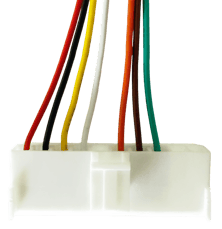
Smaller 8-pin side of the wiring harness |
Larger 10-pin side of the wiring harness. Please note the use of an Orange wire on the harness.
|
|
If Using The PTAC's Pigtail/Whip |
If Using The PTAC's Pigtail/Whip |
|
Anacove Screw Terminal Wiring Harness Wire Color |
PTAC Pigtail/Whip Wire Color |
|
Red |
Red |
|
Black |
Black |
|
Yellow |
Yellow |
|
White |
First White |
|
N/A |
Second White Not Used |
|
Blue |
Blue |
|
Brown |
Green |
|
Green |
Purple |
|
Orange |
Not Used |
|
N/A |
Brown Not Used |
|
N/A |
Pink Not Used |