
LG LPxxxIHP PTAC Configuration Guide
|
Remote Thermostat Interface |
Remote Thermostat Interface Image |
|
Pin Header - Use Anacove LG Pin Header Wiring Harness |
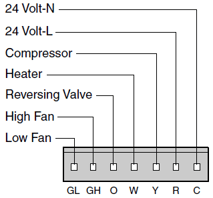
|
LPxxxIHD Remote Thermostat Enable:
|
Step |
Image |
|
|
1 |
The PTAC should be powered on |
|
|
2 |
Hold down the Temp down and Timer buttons for 3 seconds until the display shows dC and enters the settings configuration |
|
|
3 |
Press the mode button until the first digit on the PTAC display is 1 |
|
|
4 |
Press the Temp up button until the PTAC display shows 11 |
|
|
5 |
Press the mode button |
|
|
5 |
Hold down the Temp down and Timer buttons for 3 seconds to exit the settings configurations |