
Comfort-Aire PTACxxxxxxx & PTHPxxxxxxx PTAC Configuration Guide
|
Remote Thermostat Interface |
Remote Thermostat Interface Image |
|
Screw Terminal |
|
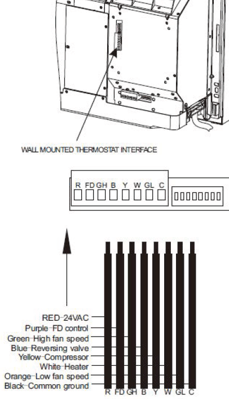
Comfort-Aire PTACxxxxxxx & PTHPxxxxxxx Remote Thermostat Enable:
|
Steps |
Image |
|
|
1 |
Turn PTAC off |
|
|
2 |
Press HEAT and + buttons at the same time for 3 seconds until you hear a buzzer |
|
|
3 |
The LED screen on the PTAC should read "r" to confirm it is in remote thermostat mode |
If LED reads "P" instead of "r" then repeat step 2 until it reads "r" |
AN40400 - Screw terminal PTAC wiring harness color coding guide:
***Unused Anacove Wiring Harness wires should be removed from the Wiring Harness. Cut the wire off approximately 1/2" from the HVAC Controller end of the harness***
|
Anacove Wire Color |
Comfort-Aire Remote Thermostat Interface |
|
Red |
R |
|
Black |
C |
|
White |
W |
|
Yellow |
Y |
|
Green |
GL |
|
Brown |
GH |
|
Blue |
B |
|
Orange |
Not Use |